What is Webflow e-commerce and what are its advantages?

.avif)
.avif)
.avif)
.avif)
Webflow is increasingly establishing itself as the best website creation tool no-code. It offers greater creative freedom than its competitors (WordPress or Wix, for example). But is Webflow also the ideal tool for developing e-commerce sites?
Webflow has an integrated solution for developing e-commerce sites, called Webflow E-Commerce. This option adds all the necessary features for managing an e-commerce site to your Webflow project.
How does this solution work, and what are its advantages compared to other software? This article explains why it's beneficial to use Webflow E-Commerce for developing your online store.
For more information about Webflow, we invite you to consult our in-depth presentation of Webflow.
I. What is Webflow E-commerce?
Webflow E-commerce is an integrated solution within Webflow for creating online stores. This allows you to enjoy the benefits of using Webflow while having all the necessary features to manage an e-commerce site: payment methods, product management, and more.
Webflow E-commerce thus allows you to create sites without writing any code. Through simple "drag-and-drop" actions, you can design sophisticated, custom, and engaging websites that will generate traffic.
In Webflow, the Content Management System (CMS) is intuitive and easy to use. This allows you to quickly add and modify the products you offer for sale. Collections allow you to group your products by category, making it easier to integrate filters and search features for your users.
Webflow E-commerce is also equipped with an admin interface that allows you to view the entire transaction history. This gives you all the necessary information to identify trends and conduct targeted marketing campaigns. Webflow E-commerce is therefore a versatile tool that allows you to quickly develop effective e-commerce sites.
II. The Advantages of Webflow E-commerce
A. The Simplicity of Using Webflow E-commerce
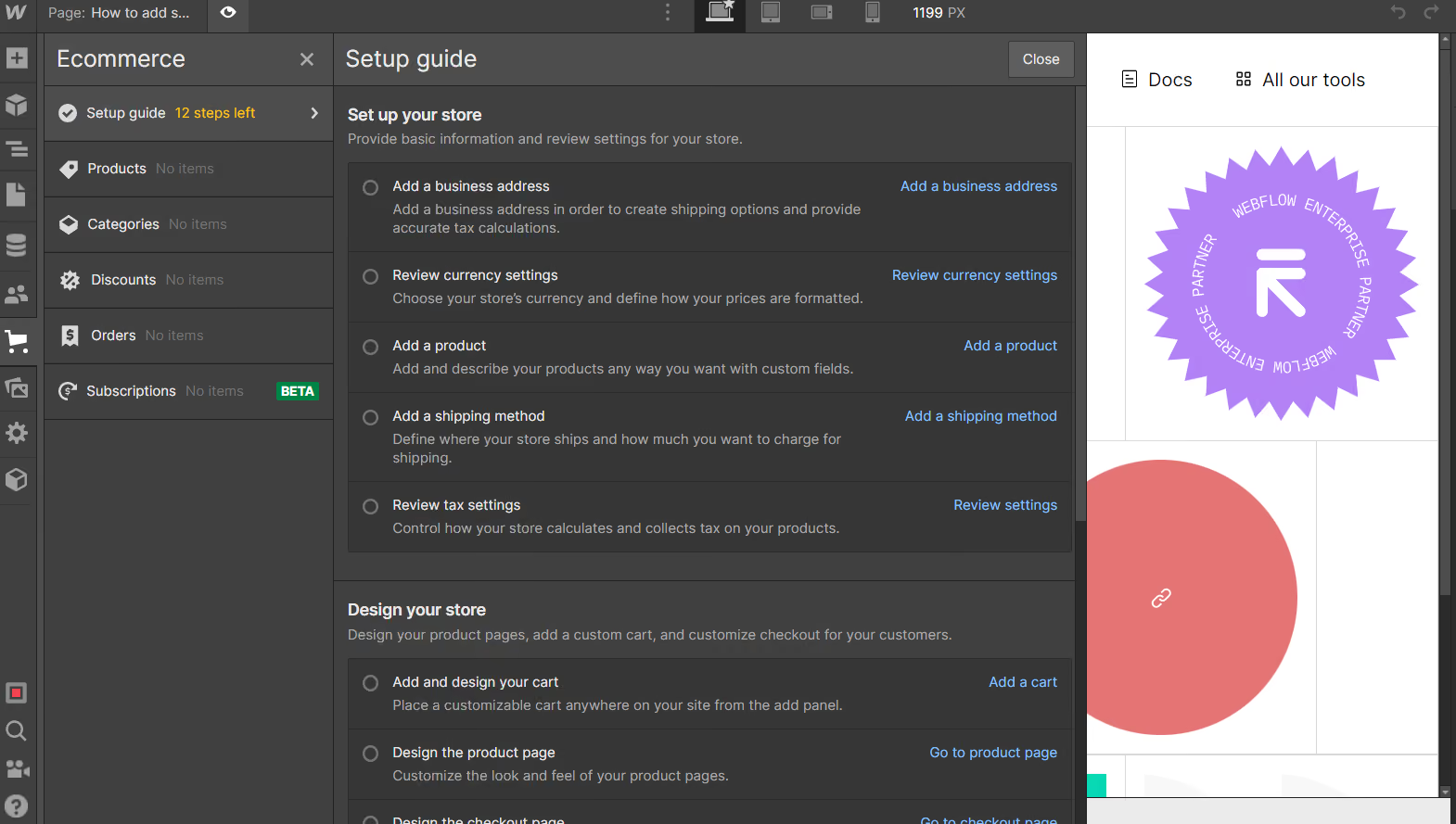
Webflow E-commerce supports you throughout the creation of your e-commerce site. All essential elements are directly requested from you to automatically integrate payment and order processing methods.
You will thus enter your address, the transaction currency used by your site, etc., to properly configure the management of your online store, all very simply.
Beyond the sales and management features of your online store, Webflow E-commerce benefits from the ease of use of Webflow. This allows you to develop your entire site with just clicks, without any computer programming.
B. Creative Freedom
Many popular tools, such as Shopify or Prestashop, offer similar services. In addition to creating showcase websites, these software solutions offer numerous automations to simplify the management of your website as much as possible. However, this simplicity often comes at the cost of creative freedom.
Indeed, one of Webflow's advantages lies in itsthe immense creative freedom designers have. Webflow E-commerce benefits from the same interface and thus leverages the fact that the possibilities are endless on Webflow.
Most website builders require you to start from "templates" or pre-existing models. More flexible, Webflow E-commerce offers templates but also allows you to design your site entirely from a blank canvas.
This allows you to achieve the pixel-perfect product you envision without being constrained or limited by anything.
You can also easily and intuitively add numerous animations and interactions to make your site engaging and enjoyable to explore.
C. SEO at the heart of the tool
Webflow E-Commerce benefits from the SEO benefits of Webflow. Your pages therefore load on average faster than those of sites developed with other tools.
Webflow E-commerce sites are hosted on Amazon servers, which guarantees you optimal performance and data security.
Equipped with an SEO recommendation tool, Webflow alerts you to any errors it finds on your site and suggests corrections to fix them.
You also have control over the title tags and meta description tags for each of your pages to optimize your Google ranking. This allows you to increase product visibility and appear in more search results.
For more information on configuring SEO in a Webflow project, we invite you to read our complete guide to Webflow SEO.

III. Webflow Ecommerce Plans
Webflow E-commerce offers a free version to get familiar with the tool. However, you cannot host your site on your own domain name. To access your site online, you will therefore need to subscribe to one of the following plans :
- $29 / month for the Standard version : Limited to 500 different products, 2% transaction fees
- $74 / month for the Plus version : Limited to 5,000 different products, 0% transaction fees
- $212 / month for the Advanced version : Up to 15,000 different products and 0% transaction fees
The choice of subscription should therefore be made based on the quantity of products offered on your e-commerce site. You can easily modify your subscription according to your site's traffic and needs.
Be aware that if you have high activity or expensive products, it might be more beneficial to switch to the Plus version even with fewer than 500 products, in order to pay the higher subscription fee but avoid transaction fees.
This feature is a major differentiator from most other e-commerce website builders, which take a percentage of your sales regardless of your plan and activity.
IV. Frequently Asked Questions
Which tool should I choose to create my e-commerce site?
There are many tools for creating e-commerce sites, each with its own specific features. However, we recommend using Webflow E-commerce if you have some technical knowledge, as this tool offers the greatest creative freedom and can quickly become the most cost-effective option.
Shopify is the easiest solution to use, allowing you to start from an existing base. Both of these technologies are equipped with effective and relevant analytical tools.
What payment methods are available with Webflow E-commerce?
Webflow E-commerce offers payments via Stripe, Apple Pay, Google Pay, and PayPal. Payment method integration is done directly from Webflow and requires no programming.
Once developed, is it easy to add new products to my Webflow Ecommerce site?
Webflow E-commerce features an Editor mode, available to e-commerce site administrators.
Once your site is live, you can add and edit your products directly from an intuitive and streamlined interface, without needing Webflow itself. This feature ensures your site is up-to-date and manageable, putting you in control.

See also our other articles
Discutons de vos besoins
Vous cherchez une agence de confiance pour votre projet ? Contactez-nous et découvrez comment nous pouvons vous aider