Everything You Need to Know About Logo Design, Especially with Figma

.avif)
.avif)
.avif)
.avif)
In this article, we'll detail all the steps and useful information to become an expert in logo creation, especially on Figma.
The logo is the cornerstone of a company's brand identity. It is often the most recognized element of a company and embodies its brand image.
Be aware, using the word 'logo' to refer to a brand's identifying element is a misnomer. There are actually various types of logos, which we will present below.
Get ready to discover the secrets to creating a successful and impactful logo.

I. Logo Briefing: Gathering Guidelines and Information
Logo creation must absolutely begin with information gathering. A logo's purpose is to represent a brand. It is therefore essential to have as much information as possible about the brand in question.
1. Gather the brand's visual information
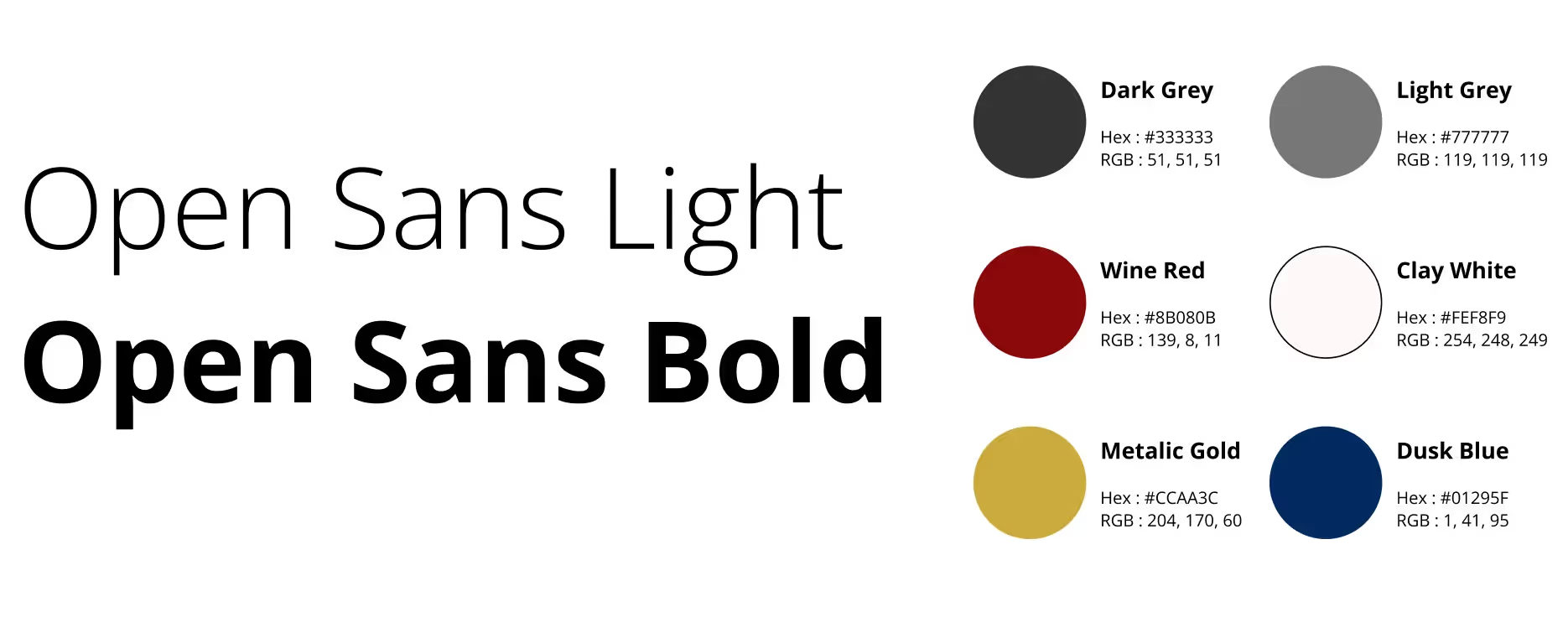
First, it is necessary to gather visual information:
- The typeface(s) to be used
- The colors chosen by the brand to represent it
If these elements are not yet defined, it is important to define them in parallel with the logo creation. This then leads to the creation of a complete brand guideline.
2. Gather theoretical information related to the project
To best understand the brand, it is also necessary to gather the more "theoretical" information:
- The brand's image, its history, its clientele, its competitors, its ambitions, its projects...
- Which communication channels will be primarily used (website, business card, flyers, brochures...)
3. Organizing your Figma workspace
Gather all elements collected during the framing phase in one place. Organize these elements clearly and visually.
In your Figma document, we recommend that you create a dedicated page for the entire logo creation process.
Within this page, create a frame dedicated to general information.
You can name this frame 'Logo Resources' or 'Brand Information', for example.

II. In-depth research and graphic exploration to start logo design
Now that you have gathered the available information to design your logo, it is necessary to do your research and work on the logo's universe.
1. Essential documentation for a successful logo
Researching what already exists is an excellent way to determine what to do and what to avoid. This allows you to establish an interesting, original, and relevant creative direction for the logo to come.
The two main categories of entities we recommend you research thoroughly are:
- The client company's preferred references. In other words, companies whose logos and branding appeal to your client. This allows to gain a clearer insight into the visual styles within which to design the logo.
- The client company's competitors. Reviewing competitors' logos provides a clear idea of current trends in the industry, particularly to differentiate yourself more effectively.
Next to your first frame, create a new frame to store screenshots of the various logos you've found. Once again, make sure to organize your elements to separate competitors and references.

2. Creating a Moodboard to define the logo's aesthetic
We're getting closer to creating the logo. Now that you have all the company's information, its references, and its competitors, you can create a moodboard.
This will help you create the logo's aesthetic and immerse yourself in the creative process by focusing on the atmosphere, colors, and inspirations that will be useful during the design phase.
A moodboard is a document that includes visual and graphic elements that inform the aesthetic of the element to be created. It often consists of colors, typography, drawings, and logos... but also, and most importantly, many photographs and images!
We recommend creating your Moodboard in a separate frame from the previous ones to make it an isolated and self-sufficient board.

III. How to Create Your Logo?
1. Choose the logo type to create
There are different types of logos. Now that you have gathered all the necessary elements to move on to the design phase, you need to determine with your client which type of logo is most relevant for their brand.
Here are the different types of logos and some examples of companies that use them:
- The wordmark: text styled with a representative font and colors.

- The monogram: A few striking, memorable, and refined initials.

- The pictorial mark: Also called a symbol, a drawing (figurative or abstract) that illustrates the brand. Twitter has a mascot pictorial mark.

- The mascot: A character, human or not, that represents the brand.

- The combination mark: An association of a wordmark and a separable pictorial mark.

- The Emblem: A pictogram that contains an inseparable logotype.

You might be undecided on which type of logo to choose. In that case, limit yourself to two options so you don't spread yourself too thin during the upcoming creation phase. It's better to have 4 or 5 alternative proposals for one type of logo rather than 2 proposals for three different types of logos.
Tip: To help you with this task, you might consider using AI logo generation tools (canva, logoai, looka) or dedicated Figma plugins such as logoipsum.
2. Creating Multiple Proposals
Now it's your turn. Unleash your creativity and draw maximum inspiration from the preliminary steps (especially the moodboard) to create relevant and varied logo proposals.
Figma is very useful for creating logos, as you have many features at your disposal, all in one place. You can easily duplicate and modify elements to create variations of them.
Present your creations to your client, then refine the preferred designs to determine which one to keep.

3. Finalizing the Chosen Logo
Once you have selected a proposal, it's time to refine and finalize the logo in every detail to achieve a clean, aesthetic, and impactful result!
We recommend providing several variations of the final logo to your client. Here are the most popular and practical logo formats :
- Square or vertical logo: useful for social media
- Favicon: a contrasting square logo with a background that appears at the top of a web page, for example
- Horizontal logo: generally used on websites and communication materials
- Black monochrome logo: useful for print documents and stamps, for example
- White monochrome logo: useful for integrating the logo onto any colored or dark background
- Eco-Logo: an outline version of a logo to limit ink usage
Figma allows you to create all logo variations very easily thanks to the quick duplication of elements, and modifying them is just as easy.
IV. Further Questions to Learn Everything About Logo Creation
1. What is a baseline?
Some companies have what's called a tagline, which is an impactful phrase often placed alongside their logo.
Remember to discuss this with your client before starting the design to gather all the necessary information and integrate the tagline into your creative process from the outset.

2. How to choose the right colors for a logo?
Each color is associated with certain characteristics and values.. To make the right choices in your design, consider consulting the meaning of the colors you wish to use. We have actually written an article on the use of colors in brand guidelines or a logo.
Furthermore, to ensure you choose complementary and sufficiently contrasting colors, you can use Adobe Color-Wheel or Coolors, for example.

3. What format should a logo be exported in?
The most frequently used logo export format is PNG, which has the advantage of having a transparent background.
WebP is a format that compresses images while maintaining their resolution quality. It can therefore be useful in many situations.
SVG is a vector format that lets you resize the logo based on its container. It is particularly useful for digital applications (website).
Tip: In Figma, easily export your logos, images, and creations by using the "Export" function at the bottom right of your workspace to choose the format and quality for your elements.

You now have all the essential knowledge to design high-quality logos!
We invite you to share your creations to get our feedback on them or to contact us to discuss this further.

See also our other articles
Discutons de vos besoins
Vous cherchez une agence de confiance pour votre projet ? Contactez-nous et découvrez comment nous pouvons vous aider